Sonos Widget Pro 2.2

Posted by Unknown Selasa, 02 Oktober 2012 0 komentar
Sonos Widget Pro v2.2 Apk - Control your Sonos system directly from your home-screen! Sonos Widget is a widget for your Sonos system.

Choose from three types of widgets;
• Normal (4x1) 
• Extended (4x1) same as Normal, but also shows the album art of the current track.
• Controller (4x4, Android 3.0+, Pro only) re-sizable widget which gives you complete control of your entire Sonos System.

Features:
• Manage all your zones.
• Support for multiple systems (Home/Work etc).
• See whats currently playing.
• Playback & Volume control
• Support for multiple active widgets, each one controlling a zone.
• Changes appearance of your widgets, choose from multiple themes.
• Controller Widget for Android 3.0+ that gives you a complete overview of your entire Sonos system.

------ Basic setup ------ 
[Adding your ZonePlayers]
- Drag a Sonos Widget to your home-screen, open the menu and select "Add ZonePlayers", follow the instructions.

[Select ZonePlayer for the widget (Normal and Album widget)]
- After adding your ZonePlayers, select a player and proceed by selecting "Set as active". Remember to exit the application using the Back-button.

[Switch from Playback to Volume control (Normal and Album widget) ]
- Tap on the Artist/Track label to switch view states.

[Changing active player for widget (Normal and Album widget) ]
- From the Volume control view, open the settings and select the new player then select 'Set as active'.

[Changing appearance of widget (Normal and Album widget) ]
- From the Volume control view, open the settings and select 'Change apperance'.

[View queue (Controller-widget)]
- Tap the artist/track label on a given ZonePlayer to show it's queue.

----- Issues -----

[Widget has stopped working]
- If you updated to 2.2 you need to re-add your widgets to your homescreen AND re-scan your network.
- In the case that ALL your ZonePlayers have recived new IP-adresses you need use the "Add ZonePlayer" feature to refresh your ZonePlayers.
- Enable 'High Performance' if you are experiencing frequent connection drops.

Sonos Widget Pro 2.2
$1.21


[No connection]
- Make sure that the phone is connected to the same WiFi-network as the ZonePlayers. 
- The network must support UPnP (this might be disabled by default on your router). 
- The following ports are using for connecting to a ZonePlayer: 6969, 1900 and 1400.

[Widget is not showing]
- Make sure you have selected a ZonePlayer as active for the current widget, this is indicated by a symbol on the ZonePlayer in the list of players.
- When adding a widget make sure that you exit the settings using the Back-button and not via home.

[Sonos Widget is not shown in the Widget list]
- On some devices and custom ROMs it is sometimes necessary to reboot the device before the widget will appear in the list.

[Sonos Widget does not find any ZonePlayers on my network]
- Try disabling any network firewall that might cause issues.
- Make sure that the following ports are not blocked on your network: 6969, 1900 and 1400.

See in-app help for further assistance or contact me at contact@freddroid.st!

----- Contact ----- 
Please email contact@freddroid.st if you have comments/questions/problems with this application.
Leaving comments and ratings in the market is great, but I have no way of contacting you to respond to your comment.

----- Permissions ----- 
android.permission.INTERNET - This is required for communicating with the ZonePlayers.
android.permission.CHANGE_WIFI_MULTICAST_STATE - This is required for connecting to your ZonePlayers.
android.permission.ACCESS_WIFI_STATE - This is required for some features on devices running HTC Sense 4.0.
android.permission.ACCESS_NETWORK_STATE - This is required for detecting network changes (WiFi turned on/off)
android.permission.WAKE_LOCK - This is needed to ensure that WiFi remains active during some actions (adding ZonePlayers etc).

Tags: sonos widget android, se.freddroid.sonos, sonos, sonos app android v3.8.

This application is not endorsed by or associated with Sonos, Inc.

Sonos Widget Pro 2.2

REQUIRES ANDROID:2.2 and up

Download Apk :

Market :
https://play.google.com/store/apps/details?id=se.freddroid.sonos.pro

Baca Selengkapnya ....

Conjure 1.1.0

Posted by Unknown 0 komentar
Conjure v1.1.0 Apk - Conjure is the fastest, smartest launcher for Android. Use it to open apps, make calls, toggle wifi, adjust volume, and much more. Search results are prioritized according to use so your favorite apps and contacts are always a keystroke away. Start typing and watch the magic happen.

Features:
* Find and launch apps
* Find contacts by name or number. Call, view, or sms contacts
* Adjust Android's volume
* Toggle wifi, bluetooth, airplane mode, silent mode, and vibrate mode
* Make your device speak using text to speech
* Search the web
* Conjure results are prioritized by frequency of use
* Devices with a search button: Long pressing the search button opens Conjure
* Optional system tray notification for easy launching
* 2 Widgets:
- Conjure Search Widget
- Conjure Search & History Widget (Android 3.0+)
* Optimized for phones and tablets


Conjure is not a home screen replacement. Instead, Conjure complements your existing home screen by providing the quickest app launching experience possible.

tags: quick, action, search, launch, launcher, recognition, fast, toggle, settings, search, text actions.


REQUIRES ANDROID:2.1 and up

Download Apk :

Market :
https://play.google.com/store/apps/details?id=com.iojess.conjure

Baca Selengkapnya ....

Audio Control 1.8.1

Posted by Unknown Senin, 01 Oktober 2012 0 komentar
Audio Control v1.8.1 Apk - Total Sound Control

Audio Control provides an amazing and unique volume management experience.

Audio Control has 5 components: Profiles, Schedules, Exceptions, Quick and custom Vibration. Each provides a unique way to control how your phone sounds and behaves.

A complete tutorial can be found at: http://www.mobiletrialware.com/audiocontrol

The purpose of Audio Control is to allow you to create and manage unique audio profiles and switch between them with ease. When a profile is applies all the sounds of the device will change to match that profile.

**FEATURES**

★ Separate Notification and Ringer volumes for ICS/JB devices
★ 12 Widgets that are completely customizable
★ Schedule all device sounds by day and time
★ 10 Shortcuts to access any part of Audio Control or apply a profile quickly
★ Profile widget that is resizable and can have multiple instances
★ Download FREE custom widget background or make and share your own from the developers website
★ A separate speakerphone volume for when the speakerphone is too loud or quiet
★ Profiles for Headsets (Bluetooth and Wired)
★ Locale and Tasker support for scheduling by location and more!* (Requires Locale or Tasker app)
★ Complete Tutorial so you don’t miss out on anything
★ Tablet optimized
★ Car Mode Profile
★ Never miss a text or phone call "Exceptions" which will auto adjust the volume
★ Adjust the device volume settings for a short period of time with "Quick" great for meetings or naps!
★ Custom vibration patterns for any installed application (ICS+ only)
★ Attach a ringtone to an Audio Profile

Audio Control 1.8.1
$2.99

Profiles are a way to save and restore audio profiles, with one tap put your phone on Silent, Vibrate, Loud, Sleep, or whatever you can imagine.

Schedules provide a way to apply your audio profiles by day and time. For example apply a Sleep profile every night before bed. Or a work profile before you arrive to work.

Quick will apply a profile for a short pre-determined time and then apply a different profile when that time is up. Useful for those quick meetings the boss surprises you with.

Exceptions are a great way to never miss a phone call or SMS (Text) message. Add a contact to exceptions and when they contact you a profile will apply just moments before so you don’t miss them. "Go SMS Pro" not supported.

Widgets and Shortcuts are a great way to access any part of Audio Control from your home screen. Apply a profile with only one click! There are lots of widget and shortcut options to choose from, so don’t miss out!

Free widget background packs can be found by visiting:

Localization: 
English (Thanks Me!)
Spanish (Thanks Cory)
French (Thanks ModsZilla)
Dutch (Thanks Stijn)
Hungarian (Thanks Attila)

If you would like to translate Audio Control please send me an email!

PERMISSIONS:

READ_PHONE_STATE lets the app know when a phone call has started
MODIFY_AUDIO_SETTINGS modifies the audio settings
VIBRATE lets the phone vibrate when the option is selected
WRITE_EXTERNAL_STORAGE to create a file and use optional widget backgrounds
WRITE_INTERNAL_STORAGE to create a file and use optional widget backgrounds
RECEIVE_SMS used in "Exceptions" to know when a SMS message is received
READ_PHONE_STATE used in "Exceptions" to know when a phone call is received
READ_CONTACTS used in "Exceptions" to know what contact to use
BLUETOOTH is used to apply profiles when a bluetooth headset is activated and deactivated.

Audio Control 1.8.1

REQUIRES ANDROID:2.2 and up

Download Apk :

Market : 
https://play.google.com/store/apps/details?id=com.matthew.rice.volume.master

Baca Selengkapnya ....

franco.Kernel updater 6.8.1

Posted by Unknown 0 komentar
franco.Kernel updater v6.8.1 Apk - This application supports the following devices:
* Galaxy Nexus - 4.0.3, 4.0.4, 4.1 and 4.1.1
* HTC One X International Version (Tegra 3 variant)
* Samsung Galaxy SIII International Version (Quad-core variant)
* Asus Google Nexus 7


franco.Kernel updater app features:
HTC One X:
* Downloads boot.img and modules directly from the FTP
* CPU tools with the ability to change governor parameters and mess with the default governor and CPU frequencies
* Full control over the 4 cores - you can chose how many cores you want your device to use
* Live watch over the 4 cores by the second - you can see the device turning on/off the cores live

Samsung Galaxy SIII:
* Kernel downloader
* Kernel auto-flash
* Frequency and governor interface
* GovernorControl - full control over PegasusQ
* Tons of custom settings to maximize user experience
* Kernel backup/restore interface
* Power Modes interface - presets and ability to create your custom power modes
* More to come

Nexus 7
* Officially supported stamp
* Kernel updater/downloader
* Kernel backup interface
* CPU clocks/governor interface
* Governor Control interface
* CPU's online/offline live feed
* Tons of settings
* Power Modes & Custom Power Modes

franco.Kernel updater 6.8.1
$3.86

Galaxy Nexus:
* Downloads the kernel directly from the ftp
* Checks for updates directly from the ftp
* Checks and downloads Imoseyon's kernel (new feature)
* Kernel auto-flash
* Cpu frequencies changer
* Governor changer
* Voltage control interface
* Kernel settings:
* Hotplug enabler
* Color Control - You're able to change GAMMA values and Color Multipliers to achieve the best color profile
* Sound Control - Increase the max volume of your device
* Download special franco.Kernel boot animation
* Wi-fi special mode to boost signal during streaming while on screen off
* Custom download path
* Live calibrated voltages panel
* Disable logger
* SQlite defrag on boot
* Dedicated milestone and nightly kernels changelogs
* A widget with pertinent information
* Power Modes in prebuilt presets for maximum flexibility
* Kernel backup/restore interface
* Color Profiles interface - create your own presets and load them up when you want


This kernel gives your phone the best performance you've ever seen, with the best battery life as can be seen by the following comments:

"I've been running AOKP with Franco's 7.1 and its amazing.

Thank you for your hard work."

"This kernel + AOKP = Pure awesomeness. 
Pretty much the best performance I've ever had on any device as of yet.
Thanks so much for your continued effort "

"Cracked it Franco , well done. Screen-off efficiency it better than stock for me! Went to bed at 65% woke up over 10 hours later and it was 64%!"


This application and kernel will ONLY work with Ice Cream Sandwich 4.0.3/4.0.4 or Jelly Bean 4.1/4.1.1 and you need root and a custom recovery to flash the .zip. If you don't have root or a custom recovery please check this fabulous tool: http://forum.xda-developers.com/showthread.php?t=1392310

Main tester of this app and kernel:
Christian Göllner - get his app here: https://market.android.com/details?id=com.cgollner.benchmark

*DISCLAIMER*

I take no responsibility for any fault or damage caused by any procedures within this guide. No warranties of any kind are given.

franco.Kernel updater 6.8.1

REQUIRES ANDROID:4.0 and up

Download Apk :

Market :
https://play.google.com/store/apps/details?id=com.franco.kernel

Baca Selengkapnya ....

Better Terminal Emulator Pro 4.04

Posted by Unknown 0 komentar
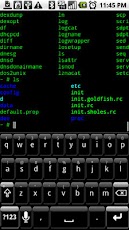
Better Terminal Emulator Pro v4.04 Apk - Harness the native Linux command-line potential of Android with this Terminal.

BTEP is an advanced multi-session Terminal Emulator and SSH client for your phone, tablet and Google TV. It also supports Telnet and FTP. Unleash the command line potential of the Android console with this terminal. Tons of real Linux utilities, root not required. Long press display for more options. Run native Linux apps with Better Terminal Emulator Pro. Excellent bluetooth, USB, hard and soft keyboard and Sywpe support, send all VT-220 character codes including F1-F20. Includes SSH/Telnet/FTP client, BusyBox, BASH Shell.

If you find any bugs or have any ideas for improvement, please contact me via email, or file a report at:

Please do not leave bug reports in the comments section, as there is not enough space to adequately describe the issue, and I have no way to respond in order to get more information.

Great for tablets such as the Viewsonic gTablet, Motorola Xoom, Galaxy Tab 10.1, ASUS Transformer!

Works great with the Motorola Bluetooth Keyboard and Apple Wireless Keyboard on Xoom and Galaxy Tab 10.1. Honeycomb support for the tablet form factor as well as HDMI out on the Xoom. Works well with Samsung Galaxy Tab 10.1 keyboard dock.

Better Terminal Emulator Pro 4.04
$3.99

If you are having trouble with the soft keyboard on HTC phones like the Desire HD or Thunderbolt, try changing to another soft keyboard. Seems like the HTC soft keyboard has some issues with BTEP, but other keyboards work fine. Hacker's Keyboard is my new favorite keyboard for use with BTEP.

Now includes Frotz and the classic Colossal Cave Adventure game in the enhanced utilities for fun. Busybox has recently been updated to support SMP systems, ie, in "top."

Explanation of Permissions:
All permissions used by BTEP are strictly for enabling the functionality of BTEP. BTEP does not contain any analytics, or collect any data.

Network Communication - Required so that the shell, SSH, Telnet, and FTP can access the Internet.
Storage - So you can manipulate contents of /sdcard/ on your device from the shell.
System Tools - Allow user to keep WiFi and/or display active if desired.
Hardware Controls - Control vibrator for vibration on cursor keys / virtual DPAD.
System Tools - Install Shortcuts, does what it says.

Better Terminal Emulator Pro 4.04

REQUIRES ANDROID:1.6 and up

Download Apk :

Market :
https://play.google.com/store/apps/details?id=com.magicandroidapps.bettertermpro

Baca Selengkapnya ....

Wondershare PowerCam 2.0.5.120929

Posted by Unknown 0 komentar
Wondershare PowerCam v2.0.5.120929 Apk - Have great fun with photos

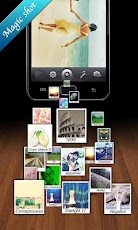
PowerCam is a powerful yet easy-to-use camera app. All the tools you need to capture and share fantastic photos can be easily found right here in this elegant and easy to master Android app.

Its iOS version has rocked the iOS community when it launched in December of 2011 and has since accumulated over 25 Million downloads on the Apple iTunes App Store; earning the app coveted “App of the Week” and “Staff Favorites” status in the App Store. PowerCam is also the #1 iphoneography app in dozens of countries.

★PowerCam’s Super Powers★

Cool Filters & Effects
PowerCam gives you tens of cool filters and effects letting your creativity shine. More filters and effects keep coming to surprise you.

Tilt-Shift
Tilt-shift is a unique type of photography in which the life-sized location or subject looks like a miniature-scale model. Usually, a powerful camera equipped with a tilt-shift lens is required. Now, PowerCam is all you need. Shoot subjects from a high angle (especially from the air), select the focus in 2 ways, and done.

FaceTimer (requires front-facing camera)
Advanced face tracking technology makes portrait shooting easier than ever. All the faces in the frame will be recognized and focused automatically. 3, 2, 1, smile~

Wondershare PowerCam 2.0.5.120929

Panorama
Panorama is a popular way to represent landscapes and historical events in wide angle photos. In PowerCam, one seamless panoramic image can be easily created by slowly moving the phone and capturing overlapping frames.

Collage
Merge several photos into a single stunning one with various frame styles, colors and different layouts in taps.

Social Sharing
After capture, the photo can be immediately posted to Facebook, Twitter, and even emailed in one step only.

Send us your comments and suggestions by visiting http://www.powercam.ws/ to help us make PowerCam better.

Wondershare PowerCam 2.0.5.120929

REQUIRES ANDROID:1.6 and up

Download Apk :

Market :
https://play.google.com/store/apps/details?id=powercam.activity

Baca Selengkapnya ....

GMD GestureControl ★ root 4.2.1

Posted by Unknown 0 komentar
GMD GestureControl ★ root v4.2.1 Apk - Control tablet with MULTITOUCH gestures like iPad. Hide status bar, full screen.

Control device with MULTITOUCH and MULTITASK gestures similar to iPad. Works in all applications. You can even hide status bar and enjoy full screen in your favorite games or while browsing.

★ Try Lite version before you buy
★ Requires root access
★ USB Debuging must be enabled in Android setting

★ Multitouch
★ Multitask - start any application, shortcut or custom action without leaving current application
★ Custom actions - LaunchPad, Start application, Previous Application, Next application, Home, Kill current application, Back, Forward, Recent application list, Recent application dialog, Menu, Notification Panel, Hide/Show status bar, Start launcher shorcut(bookmark, contacts, settings, etc), Start Tasker task, Pause gestures, Exit, Screen Off (lock), Alt+Tab, Music Play/Next/Previous, Volume, Search, Voice Search, Select Input Method.
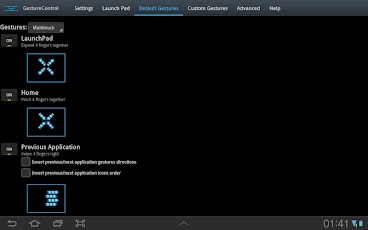
★ Swipe 4 fingers right - open previous application
★ Swipe 4 fingers left - open next application
★ Expand 4 fingers - LaunchPad (similar to SwypePad, start any application, shortcut or custom action)
★ Pinch 4 fingers - Home gesture
★ Swipe 3 fingers down - Back gesture
★ Swipe 3 fingers up - Bottom recent applications bar
★ Swipe 4 fingers up - Hide/Show status bar (experimental)
★ Custom gestures - create your own gestures to start any application, shortcut or custom action

THERE IS NO WAY TO ANSWER MARKET COMMENTS OR CONTACT COMMENTATOR - EMAIL ME IF YOU WANT ANSWER.
Please don't post your problems in market, email me or go post to XDA, thanks:

GMD GestureControl ★ root 4.2.1
$5.31

If your device is listed as unsupported, please try default parsers:
1) Start application
2) Open Advanced tab
3) Is multitouch device detected properly? If not, enable 'Override multitouch device detection' and select your multitouch device. 
4) Enable 'Override touch events parser detection'. Select HC_DEFAULT. Click 'Restart service', wait a few seconds, try if it is working.
5) If it is not working with HC_DEFAULT, try ICS_DEFAULT. Don't forget to restart service again. 
6) If you make it work, please go to Help tab, click List devices and send me screenshot. Tell me that it is working with these settings. I will update application so it is detected properly in next version.
7) If it still do not work, contact me by email: goodMoodDroid@gmail.com

Known issues:
- On ICS hiding bar will reset your wallpaper to default.
Live wallpapers don't have issues. You can use "simple image wallpaper" from market to solve this problem. 
- On ICS hidden bar might reapear on some ROMs
- There is no issues on Honeycomb.

Description: This application allows you to control tablet with gestures. 
Swipe 4 fingers up to hide status bar. Do same gesture again to restore bar. 
Swipe 4 fingers right to open previous application. 
Swipe 4 fingers left to open next application. 
Pinch with 4 fingers anywhere on screen to return to home screen from any application. 
Swipe 3 fingers down to execute back action in any application.
Swipe 3 fingers up to show custom bottom bar with recent applications.
Expand 4 fingers anywhere on screen to open LaunchPad dialog. It is similar to SwypePad and allows start your most often used applications, shortcuts or custom actions anywhere anytime with simple gesture.
Works in all applications, games and browsers. 
Application will use freed space when you hide status bar. Some games even work better with status bar hidden.
There is an option to switch to single touch gestures if its more convenient. You can even create your own gestures for any action.

Full version adds following features: option to hide notification icon, custom gestures and special actions, any number of actions in LaunchPad.

GMD GestureControl ★ root 4.2.1

REQUIRES ANDROID:3.1 and up

Download Apk ;

Market :
https://play.google.com/store/apps/details?id=com.goodmooddroid.gesturecontrol

Baca Selengkapnya ....
Trik SEO Terbaru support Online Shop Baju Wanita - Original design by Bamz | Copyright of android news.