Tampilkan postingan dengan label hack windows 7. Tampilkan semua postingan

Create new partitions on windows 7 hard drive

Posted by Unknown Minggu, 30 Juni 2013 0 komentar

Create new partitions on windows 7      hard disk 
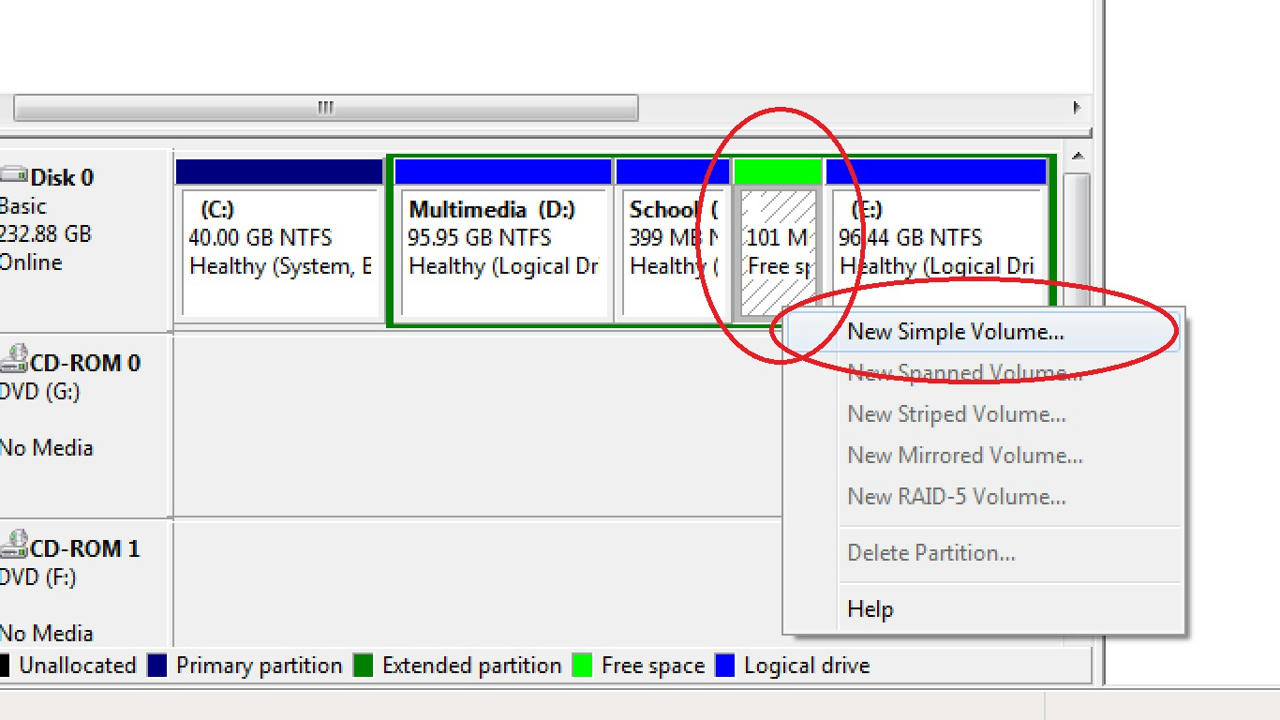
Create New partions in windows 7


Today I am going to show you how to create new partitions on windows 7 hard drive. This instructable is complete with pictures and step by step procedures so I think you won't have any difficulties in understanding.


 Step 1: Right click Computer and select Manage.


Step 2:     Select Storage > Disk Management.


Step 3:   Right click any volume and select Shrink Volume... from the menu.


Step 4: Enter the amount of space in MB to shrink and click Shrink.


Step 5:  Right click the green space labled 101 MB Free space and select New Simple Volume.


Step 6: Click Next.


Step 7: Specify the new volume size in MB and click Next.


Step 8: Select a drive letter for the new volume and click Next.


Step 9: Specify the file system, name and other settings for the new volume and click Next.


Step 10: Click Finish to create the volume.


Step 11: Wait for a moment and open My Computer. A new volume would be there!


Please remember to leave your ratings and comments. Also if you want to know how to delete the newly created volume leave it in the comments and I will post it. Enjoy!


Baca Selengkapnya ....

Hidden themes in windows 7

Posted by Unknown 0 komentar

Hidden themes in windows 7

Image

Did you know that windows has several hidden themes? Here is an easy trick to unlock the hidden themes.

Step 1:  Paste the following address into the address bar of windows explorer and
press enter : C:\Windows\Globalization\MCT
Step 2:   You will see five folders. Open any of them.

Step 3: Now you will see three folders. Open the folder named theme and open the theme file to install and apply the theme!

Step 4: Repeat step 2 and step 3 for every folder.
 If u love our post You can like Our pages and even join our group ..
thanks any doubt ask me in Comments..


Baca Selengkapnya ....

Hack Windows 7 / XP logon password.

Posted by Unknown 0 komentar

Hack Windows 7 / XP logon password.

Hack windows 7 admin password

Sometimes when you forget your windows logon password or simply want to hack into another computer, here is an easy method to bypass or change the password. The method is very easy and straightforward. In addition you don't need to download any software to do this. You only need a windows installation DVD.


Step 1: Boot from your windows installation DVD. If you don't know how to do this you shouldn't be reading this instruct-able.

Step 2: You will see a window like the one below. Click Repair your computer.

Image


Step 3: Choose the operating system and click Next.

Image


Step 5: After a while a screen like the one shown below will be displayed. Click on Command prompt link. This will open a command prompt window.

Image


Step 6: Execute the two commands below in order:
  • ren sethc.exe sethc_back.exe
  • copy cmd.exe sethc.exe

  • Image


    Step 7: Restart your computer. After restarting press the Shift key five times quickly while in the logon screen.

    Step 8: This will pop up a CMD window with the administrator privileges. 
    Now execute the command  : net user Anbu password Replace the anbu in the command with the username you want to hack and replace password with any password you want. This will change the password of the user you specified.

    Step 9: Now you can logon using the password you specified in the previous step.

    How does this work?

     The answer is simple. Windows has a feature which will open a feature called Sticky keys when the Shift key is pressed five times quickly. We are just replacing the program which starts on pressing Shift key five times with CMD.
       *So when you press Shift key five times even on the logon screen, a Command prompt window will pop up with administrator privileges instead of the sticky key feature. Then we are using the command prompt to change the password of the user.
    Remember to leave your ratings and share!
     Leave any questions or problems in the comments. Keep tuned!

    Video :
            Video will be soon.. still bookmark us.


    Baca Selengkapnya ....
    Trik SEO Terbaru support Online Shop Baju Wanita - Original design by Bamz | Copyright of android news.